

.svg)
Content Performance Metrics: A Framework for Measuring What Matters | ClusterMagic
Why Most Content Teams Measure the Wrong Things
Content teams drown in data while starving for insight. Dashboards display pageviews, bounce rates, and social shares, but none of those numbers answer the question executives actually ask: is our content investment producing returns? The problem is not a lack of content performance metrics. The problem is the absence of a framework that connects what you measure to what the business needs.
This guide provides that framework. Rather than walking through tool configurations, it focuses on building a measurement system that links content output to business outcomes at every stage of the funnel. The specific tools you use matter less than whether your metrics framework captures the right signals at the right stages.
The Four-Layer Metrics Framework
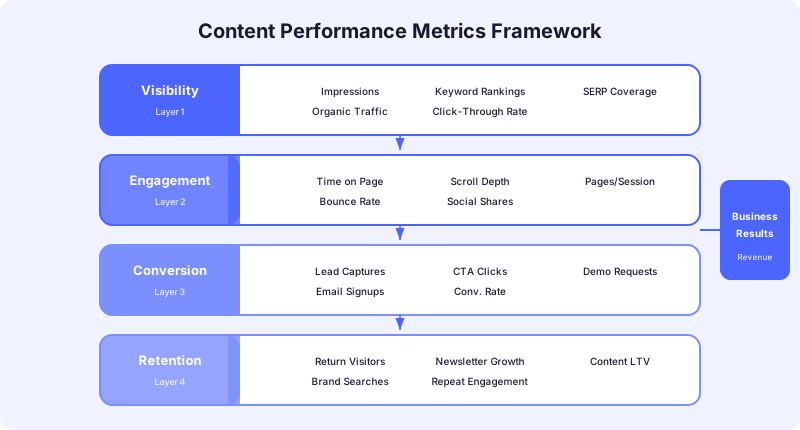
Content performance metrics fall into four layers. Each layer answers a different question, and together they tell the complete story of whether your content investment is working.
Layer 1: Visibility answers "Are people finding our content?" Layer 2: Engagement answers "Are people consuming and interacting with our content?" Layer 3: Conversion answers "Is our content driving business actions?" Layer 4: Retention answers "Is our content keeping people connected to our brand?"
Most teams over-index on Layer 1 (traffic) and ignore Layer 4 (retention) entirely. A complete framework tracks all four layers and uses them to make resource allocation decisions. The goal is not to track every possible metric but to select 2 to 3 metrics per layer that directly inform content decisions.
Layer 1: Visibility Metrics
Visibility metrics tell you whether your content is reachable through the channels where your audience searches, browses, and discovers information. Without visibility, nothing else in your framework matters.
Organic Search Impressions
Impressions in Google Search Console show how often your pages appear in search results, regardless of whether someone clicks. This metric reveals whether Google considers your content relevant to the queries you are targeting. A page with high impressions but low clicks has a positioning or snippet problem, not a content quality problem.
Track impressions at the topic cluster level rather than the individual page level. A cluster with growing impressions across multiple pages signals that Google recognizes your topical authority. A cluster with flat or declining impressions signals a gap in coverage or freshness.
Indexation Rate
Your indexation rate is the percentage of published pages that Google has actually added to its search index. If you published 100 posts and only 72 are indexed, 28% of your content investment is producing zero organic visibility.
Monitor indexation through the Google Search Console Coverage report. Pages excluded from the index due to crawl errors, duplicate content issues, or noindex tags represent wasted production effort. A healthy indexation rate sits above 90% for well-structured sites.
SERP Feature Presence
Traditional blue links are no longer the only visibility opportunity on search results pages. Featured snippets, People Also Ask boxes, and AI-generated overviews all capture attention before a user ever reaches organic position one. Track how many of your target queries include SERP features and whether your content appears in them.
According to research from Dataslayer on AI Overview impact, AI-generated answers have reduced click-through rates significantly for some query types. Content teams that track SERP feature presence can adapt their formatting, structure, and targeting to capture visibility in these new placements.
Layer 2: Engagement Metrics
Engagement metrics reveal whether the people who find your content actually consume it. High visibility with low engagement signals a mismatch between what your content promises and what it delivers.
Engagement Rate
GA4 replaced bounce rate with engagement rate, which measures the percentage of sessions where a user spent more than 10 seconds on a page, triggered a conversion event, or viewed two or more pages. This metric is more useful than bounce rate because it distinguishes between users who left immediately and users who found exactly what they needed in a single page view.
As Google's GA4 documentation on engagement metrics explains, an engaged session requires active interaction, not just a page load. Track engagement rate by content type, topic cluster, and funnel stage to identify which content formats earn the most attention from your audience.
Average Engagement Time
Average engagement time measures how long users actively interact with your content. Unlike session duration in older analytics platforms, GA4's engagement time only counts time when the page is in the foreground and the user is actively scrolling, clicking, or otherwise interacting.
A 2,000-word guide with an average engagement time of 45 seconds is not performing well regardless of its traffic numbers. Content that people actually read should show engagement times that correspond roughly to the reading time required. A 7-minute read with 4 minutes of average engagement time is performing well. The same article with 30 seconds of engagement has a structural problem.
Scroll Depth
GA4 automatically fires a scroll event when a user reaches 90% of the page. This is a useful baseline, but it only tells you whether someone scrolled to the bottom. For more granular insight, configure custom events at 25%, 50%, and 75% scroll thresholds.
Scroll depth data combined with engagement time reveals where readers drop off. If 70% of visitors reach the halfway point but only 20% finish the article, the second half of your content is losing readers. Use this data to restructure underperforming sections rather than rewriting entire posts.
Layer 3: Conversion Metrics
Conversion metrics connect content consumption to business actions. This is the layer where content proves its value beyond traffic generation.
Content-Assisted Conversions
A content-assisted conversion occurs when a user interacted with one or more pieces of content before completing a conversion action (demo request, trial signup, purchase). This metric captures the role content plays in multi-touch buyer journeys, not just last-click attribution.
In GA4, set up conversion events for your key business actions and use the Conversion Paths report to see which content pages appear in the journey. Content that frequently appears early in the conversion path is building awareness. Content that appears late in the path is closing deals. Both are valuable, but they serve different functions.
Lead Quality by Content Source
Not all leads are equal. Track which content sources produce leads that advance through your pipeline versus leads that go cold. If your top-traffic blog post generates 200 email signups per month but none of them convert to qualified opportunities, that post is producing volume, not value.
Connect your analytics data to your CRM to trace which content pieces produce the highest quality pipeline. High-performing content teams allocate production resources based on lead quality data, not traffic volume. A post that generates 20 qualified leads per month from 500 visits is more valuable than a post generating 5 unqualified leads from 5,000 visits.
Email Subscriber Growth from Content
Email subscribers generated through content represent an audience that found your work valuable enough to opt into a continued relationship. Track subscriber growth by content source to understand which topics and formats build the most engaged audiences.
This metric bridges content marketing and retention. Subscribers who enter through high-quality educational content tend to have higher open rates and lower unsubscribe rates than those acquired through gated content with inflated value promises.
Layer 4: Retention Metrics
Retention metrics measure whether your content keeps people coming back. This layer is the most overlooked and the most indicative of long-term content program health.
Returning Visitor Rate by Content
What percentage of your content audience returns within 30 days? A content program that only attracts one-time visitors through search is functional but fragile. Content that builds returning audiences creates a distribution advantage because repeat readers share, link to, and reference your content more than one-time visitors.
Track returning visitors at the content category level. If your product comparison content attracts return visits but your how-to guides do not, your guides may be answering one-time questions while your comparisons are becoming reference material. Both serve a purpose, but understanding the pattern helps you invest wisely.
Content Engagement Depth
Engagement depth measures how many pieces of content a single user consumes per session or across sessions over time. A user who reads one blog post and leaves is a visitor. A user who reads four posts across two visits in a week is building a relationship with your brand.
Track engagement depth through GA4's user-scoped metrics. A rising average content engagement depth signals that your internal linking, content quality, and topic coverage are working together to keep readers exploring rather than bouncing to a competitor.
For more on how content analytics connect to your broader SEO content analytics practice, see the companion guide.
Building Your Metrics Dashboard
A framework only works if the data is accessible and actionable. Build a dashboard that presents your selected metrics across all four layers in a format your team reviews weekly.
Weekly review metrics: Organic impressions, engagement rate, scroll depth, email signups from content. These metrics move fast enough to inform tactical decisions.
Monthly review metrics: Indexation rate, content-assisted conversions, lead quality by source, returning visitor rate. These metrics require a larger sample size to be meaningful.
Quarterly review metrics: Topical coverage ratio, engagement depth trends, content cohort performance. These metrics reveal whether your overall content strategy is compounding.
The dashboard should make it easy to answer one question: which content topics, formats, and funnel stages are producing the best return on our production investment? If your dashboard cannot answer that question, simplify until it can.
Connecting Metrics to Content Decisions
Data without decisions is just reporting. Each metric in your framework should connect directly to a content decision:
- Declining impressions on a topic cluster triggers a content gap analysis and a content refresh sprint
- Low engagement time on a content format triggers a structural redesign of that format
- High content-assisted conversions from a specific topic triggers increased production investment in that cluster
- Declining returning visitor rates trigger an audit of internal linking and content discoverability
Content marketing ROI measurement provides the financial layer that sits on top of this framework. Once you know which content drives conversions and retention, you can calculate the actual return on every dollar spent producing it.
Start With the Framework, Not the Tools
Tools change. Platforms update their metrics definitions. But the four questions your framework answers remain constant: Can people find it? Do they consume it? Does it drive action? Does it bring them back? Build your measurement system around those questions, select 2 to 3 metrics per layer, and review them at the right cadence.
If your content team needs help building a metrics framework that connects publishing output to pipeline and revenue, book a strategy session with the ClusterMagic team.
Recommended Posts





.svg)