

.svg)
Technical SEO for Content Teams: What You Need to Know in 2026 | ClusterMagic

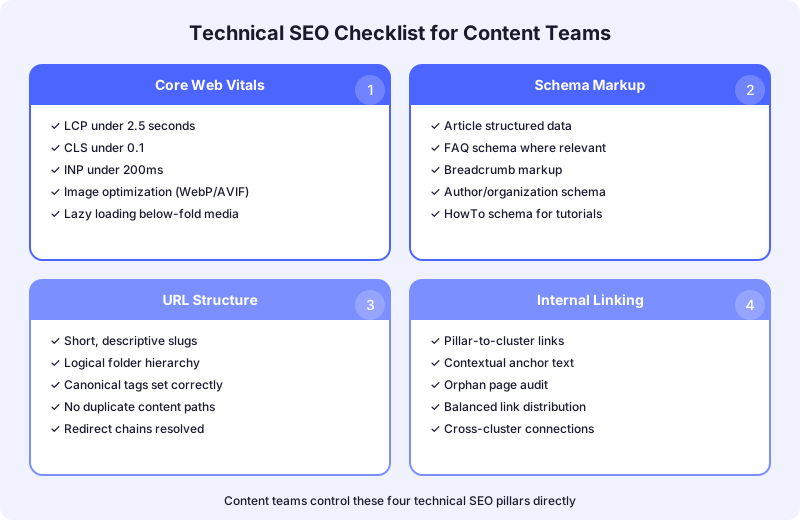
Content teams tend to view technical SEO as someone else's job. The developers handle site speed. The SEO specialist manages crawl budgets. The content team just writes. That division made sense five years ago. It doesn't anymore. In 2026, the technical SEO decisions that most directly affect rankings are decisions content teams make every day: how pages are structured, what schema gets applied, how URLs are organized, and how internal links distribute authority.
This guide covers the technical SEO concepts that content teams need to understand and act on. It skips the developer-only topics like server configuration and JavaScript rendering. Instead, it focuses on the technical decisions that happen at the content layer.
Why Content Teams Need Technical SEO Knowledge
Google's ranking systems evaluate content and technical signals together, not separately. A well-written article with poor Core Web Vitals scores competes at a disadvantage against a comparable article on a faster page. A comprehensive guide without schema markup loses rich result opportunities to competitors who implement it. The content and the container it sits in are evaluated as a single unit.
The shift toward AI-powered search has amplified this convergence. AI Overviews, which now appear in nearly half of Google searches, rely on structured data and clean HTML to parse and cite content accurately. Google's structured data documentation makes clear that Article schema helps search engines identify authorship, publish dates, and content type for rich results. Content teams that ignore the technical layer aren't just leaving SEO value on the table. They're becoming invisible to the AI systems that increasingly determine which content gets surfaced.
Core Web Vitals: The Performance Metrics Content Teams Affect
Core Web Vitals are Google's standardized performance metrics: Largest Contentful Paint (LCP), Interaction to Next Paint (INP), and Cumulative Layout Shift (CLS). According to Google's PageSpeed Insights documentation, these metrics are evaluated using real-user data from the Chrome User Experience Report, not lab simulations.
Content teams don't control server response times or CDN configuration. But they do control several factors that directly impact these metrics.
How Content Decisions Affect LCP
Largest Contentful Paint measures how quickly the main content element loads. For blog posts, the LCP element is usually the hero image or the first large text block. Content teams influence LCP through image selection and sizing. An unoptimized 4MB hero image can push LCP past the 2.5-second threshold on its own.
Practical steps content teams should follow: size images to the exact display dimensions rather than relying on CSS to resize them, use modern formats like WebP or AVIF, and specify width and height attributes in image markup so the browser can allocate space before the image loads.
How Content Decisions Affect CLS
Cumulative Layout Shift measures unexpected visual movement during page load. The threshold is 0.1 or lower. Content teams cause CLS problems most often through images without dimension attributes, embedded media that loads after the initial paint, and dynamically injected elements like ad units or CTA banners.
The fix is straightforward: every image and embedded element in your content should have explicit width and height attributes. If your CMS template injects elements like newsletter signup forms mid-article, work with your developer to ensure those elements have reserved space in the layout.
How Content Decisions Affect INP
Interaction to Next Paint measures responsiveness when users interact with the page. Content teams affect INP primarily through the complexity of interactive elements they include. Heavy JavaScript widgets, complex embedded calculators, and third-party scripts all degrade INP scores.
Before embedding any interactive element, ask whether it genuinely serves the reader or just looks impressive. A static comparison table that loads instantly serves readers better than an interactive widget that adds 200ms to every click interaction.
Schema Markup for Content Teams
Schema markup is structured data that tells search engines exactly what your content represents. For content teams, the most relevant schema types are Article, BlogPosting, FAQ, and HowTo. Implementing these correctly unlocks rich results, including featured snippets, FAQ dropdowns, and how-to panels in search results. For a complete reference on how rich results work, which schema types qualify for which features, and how to validate your implementation, the rich results and structured data guide covers everything content teams need.
Article and BlogPosting Schema
The schema.org Article documentation defines the properties search engines use to understand published content. At minimum, every blog post should include headline, datePublished, dateModified, author (with name and url), publisher, and description properties.
Content teams should treat schema as part of the content spec, not an afterthought. When you write a blog post, the headline, publish date, and author information should flow directly into the schema. If your CMS auto-generates Article schema from your content fields, verify that it's outputting correct data. Misconfigured schema is worse than no schema because it sends conflicting signals.
FAQ Schema
FAQ schema is valuable for content pages that include explicit question-and-answer sections. Studies on rich result performance show that pages with FAQ schema achieve significantly higher click-through rates than standard results. Backlinko's schema markup guide details implementation patterns for each schema type.
The content team's role is to structure content so it qualifies for FAQ schema. That means writing explicit questions as H3 headings followed by concise, direct answers in the paragraph immediately below. If your answers are buried in long paragraphs without clear question framing, the schema won't map cleanly to the content.
HowTo Schema
For tutorial and process-oriented content, HowTo schema breaks your instructions into discrete steps that search engines can display as rich results. Each step needs a clear name and description. The content format should use numbered steps with distinct headings, not flowing prose that happens to describe a process.
URL Structure and Content Architecture
URL structure is a technical SEO factor that content teams directly control through slug selection and site taxonomy decisions.
Flat vs. Nested URL Structures
A flat structure puts all blog content at the same depth: /blog/your-post-slug. A nested structure organizes content by category: /blog/seo/your-post-slug. Both approaches work, but they have different implications for crawl efficiency and topical signaling.
Nested structures reinforce topical organization by grouping related URLs under category paths. This makes the site's topical architecture visible in the URL structure itself, which helps both search engines and users understand content relationships. The tradeoff is that deeper URLs have slightly longer crawl paths.
For content-heavy sites with 50+ blog posts, nested structures are generally preferable because they keep the content architecture organized as the library grows. For smaller sites, flat structures work fine.
Slug Optimization
Every content team member should understand slug best practices. Keep slugs concise but descriptive. Include the primary keyword naturally. Avoid dates, stop words, and unnecessary path segments. A slug like /blog/seo/technical-seo-for-content-teams is clear and keyword-aligned. A slug like /blog/2026/03/what-you-need-to-know-about-technical-seo is bloated and fragile.
Once published, slugs should not change. A slug change creates a redirect requirement and temporarily disrupts ranking signals. Get the slug right at publish time by including it as a required field in your content brief template.
Crawl Optimization Through Content Decisions
Search engines allocate a finite crawl budget to each site. Content teams influence how that budget gets spent through publishing decisions, internal linking patterns, and content quality standards.
Preventing Crawl Waste
Crawl waste happens when search engines spend time on pages that provide no ranking value. Common causes that content teams control include thin content pages that cover topics already handled by other pages, near-duplicate content where multiple pages target the same keyword with minimal differentiation, and tag and category pages that create hundreds of low-value index entries.
The content framework should include rules for when to create new pages versus when to update existing ones. A content gap analysis helps identify where new content genuinely fills a gap versus where it would create redundancy.
Crawl Depth and Internal Linking
Pages buried deep in your site architecture receive less crawl attention and slower indexing. The general guideline is that important content should be reachable within three clicks of the homepage. Content teams control crawl depth through internal linking decisions.
Every new blog post should receive links from at least two existing related pages. The internal linking strategy guide covers how to build a linking system that keeps important content accessible. Without deliberate internal linking, new posts often become orphaned pages that search engines discover slowly if at all.
Indexing Decisions
Content teams should have a working understanding of when to index and when to noindex. Not every page you publish should be in Google's index. Thin resource pages, filtered views, and utility pages like thank-you pages or form confirmations should be noindexed to focus crawl budget on pages that actually compete for rankings.
The default should be to index all substantive content and noindex everything else. If you're unsure, Google's Search Console documentation provides tools to monitor which pages are indexed and which are excluded, along with the reasons.
On-Page SEO Elements Content Teams Own
Beyond the structural and technical factors, several on-page SEO elements sit squarely in the content team's domain.
Title Tags and Meta Descriptions
Title tags are the single most impactful on-page element for rankings. Every title tag should include the primary keyword, ideally near the beginning. Keep title tags under 60 characters to prevent truncation in search results. Meta descriptions don't directly affect rankings but significantly influence click-through rates. Write them as concise value propositions that tell the searcher exactly what they'll get by clicking.
Heading Hierarchy
Use a single H1 per page (your post title), followed by H2s for major sections and H3s for subsections. The heading hierarchy should reflect the logical structure of the content, not decorative formatting preferences. Search engines parse headings to understand content structure and topical coverage. A flat article with no H2s or H3s tells search engines nothing about the depth and organization of your content.
Include your primary keyword in at least one H2. Include secondary keywords in H3s where they fit naturally. Never force keywords into headings at the expense of clarity.
Image Optimization
Every image needs descriptive alt text that explains the image content in plain language. Use target keywords in alt text only when genuinely relevant to what the image shows. Compress images before upload. Use descriptive filenames rather than generic strings like IMG_4532.jpg.
Building Technical SEO Into Your Content Workflow
The most effective approach is to embed technical SEO checks into your existing content production workflow rather than treating them as a separate review step.
During briefing: Include target URL slug, required schema type, and internal linking targets in every content brief. Specify image dimension requirements and format guidelines.
During drafting: Writers should use proper heading hierarchy, include alt text for all images, and structure FAQ and how-to sections in schema-compatible formats.
During review: Editors should verify heading structure, check that internal links point to the correct pages, and confirm that images meet optimization standards.
Post-publish: Monitor Core Web Vitals for newly published pages using Google PageSpeed Insights. Check Google Search Console for indexing status. Verify that schema is rendering correctly using Google's Rich Results Test.
Technical SEO doesn't require content teams to become developers. It requires them to understand how their content decisions affect the technical signals that search engines evaluate. When those decisions become habits embedded in the production workflow, the technical foundation strengthens with every piece you publish.
Ready to build a content program where technical and editorial SEO work together? Schedule a strategy call with ClusterMagic to get started.
Recommended Posts





.svg)