

.svg)
Best Content Creation Tools for 2026: From Ideation to Publishing | ClusterMagic

Tool lists are everywhere. What's rare is a list organized around how content actually gets made. Most tool roundups throw 30 products at you alphabetically or by popularity, leaving you to figure out which ones solve your specific problems. That approach wastes time. Content creation tools matter only in the context of the workflow stage they serve.
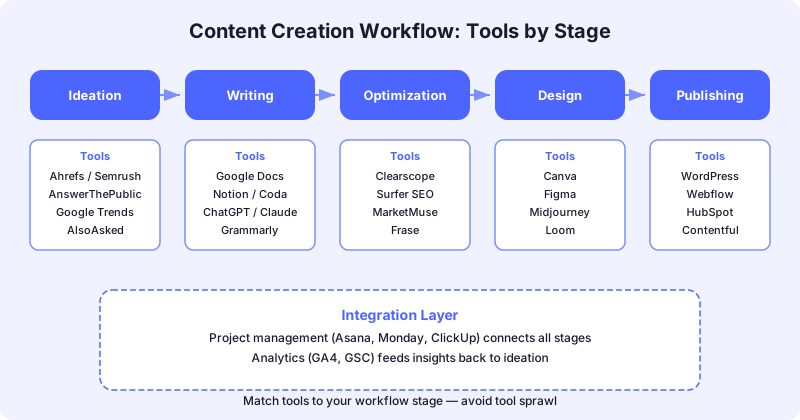
This guide organizes tools by the five stages of a content production workflow: ideation and research, writing and drafting, SEO optimization, visual content creation, and publishing and distribution. For each stage, it identifies what to look for and which tools deliver in 2026.
How to Evaluate Content Creation Tools
Before diving into specific tools, establish evaluation criteria. The right tool for a solo creator is different from the right tool for a 10-person content team. Evaluate every tool against four dimensions.
Workflow fit: Does the tool solve a specific bottleneck in your current process, or does it add complexity without clear value? A tool that requires you to change your entire workflow to accommodate it is usually not worth adopting.
Integration capability: Does the tool connect to the other tools in your stack? Isolated tools that require manual data transfer between stages create friction that slows production. Look for native integrations with your CMS, project management system, and analytics platform.
Quality of output: For AI-powered tools especially, evaluate the actual output quality rather than the marketing claims. Test each tool on your specific content types and topics before committing.
Scalability: Will the tool still work when you double your content volume? Some tools that work well for 5 articles per month break down at 20. Pricing models, API limits, and collaboration features all affect scalability.
Stage 1: Ideation and Research Tools
The ideation stage is where content programs either build on solid ground or start with assumptions that waste production effort downstream. The right research tools turn ideation from a brainstorming exercise into a data-informed process.
Ahrefs
Ahrefs' Content Gap tool is the most efficient way to identify keyword opportunities your competitors are capturing that you're missing. Enter your domain alongside three to five competitors, and the tool surfaces the keywords they rank for that you don't. This is more valuable than pure keyword research because it identifies proven opportunities rather than theoretical ones.
Beyond content gap analysis, Ahrefs' Keywords Explorer provides search volume, keyword difficulty, click potential, and SERP feature data for any keyword. The click potential metric is particularly valuable in 2026 because it accounts for zero-click searches where AI Overviews or featured snippets absorb the traffic. A high-volume keyword with low click potential may not be worth targeting.
Semrush Topic Research
Semrush's Topic Research tool takes a seed keyword and generates a visual map of related subtopics, questions, and content ideas. It pulls data from search queries, People Also Ask boxes, and related searches to surface the full landscape of a topic.
This tool is most useful during the topic cluster planning phase when you need to map out all the subtopics that support a pillar page. It helps ensure your content cluster architecture covers the full scope of a subject rather than just the obvious angles.
Google Search Console
Google Search Console's performance reports are an underused ideation resource. Filter your performance data by queries where you have high impressions but low click-through rates. These are topics where Google already considers your site relevant but your existing content isn't compelling enough to earn clicks. That's your highest-leverage content opportunity list because the authority signal already exists.
Stage 2: Writing and Drafting Tools
The writing stage is where ideas become publishable content. The tools here range from AI writing assistants to collaborative editing platforms.
Google Docs
Google Docs remains the default collaborative writing environment for content teams, and for good reason. Real-time collaboration, commenting, suggestion mode, and version history handle the core needs of a multi-person drafting workflow. It integrates with most SEO optimization tools through browser extensions and add-ons.
The key advantage of Google Docs is that it's a neutral platform. It doesn't lock your content into a proprietary format, making it easy to export drafts to any CMS. For teams that use Surfer SEO's Content Editor or Clearscope, the Google Docs integration means writers can optimize within their familiar drafting environment.
Notion
For teams that want to combine content drafting with project management, Notion provides a unified workspace. You can build content calendars, content briefs, and draft articles in the same platform. The database functionality is useful for tracking content status across a production pipeline.
The tradeoff is that Notion's text editor isn't as refined as Google Docs for pure writing. It works best for teams that value having their entire content workflow in one tool and are willing to accept a slightly less polished writing experience.
AI Writing Assistants
AI writing tools have matured significantly, but their role in a quality content workflow is specific: they accelerate drafting, not replace it. The most effective use of AI writing assistants is generating rough first drafts and outlines that human writers then reshape, fact-check, and inject with original insight.
Use AI assistants for generating section outlines from content briefs, creating first-draft body copy that writers refine, producing meta descriptions and social copy variations, and repurposing long-form content into derivative formats. The Content Marketing Institute's 2026 research found that 95% of B2B marketers use AI, but most are still developing their approach. Teams that use AI for acceleration rather than replacement consistently produce higher-quality output.
Stage 3: SEO Optimization Tools
Optimization tools analyze your content against what's currently ranking and provide specific recommendations to improve topical coverage, keyword usage, and content structure.
Surfer SEO
Surfer SEO's Content Editor analyzes the top-ranking pages for your target keyword and generates real-time optimization guidelines. As you write, it provides a dynamic Content Score from 0 to 100 based on word count, keyword usage, heading structure, and NLP term coverage.
Surfer's primary strength is turning subjective optimization decisions into data-driven ones. Instead of guessing whether you've used enough related terms, the Content Score gives you a quantified benchmark. The Auto-Optimize feature can also reoptimize existing content by identifying gaps against current SERP competitors.
Clearscope
Clearscope's optimization platform takes a similar approach but with a stronger focus on content grading and competitive analysis. It surfaces the heading structures of the top 30 pages ranking for your target query, showing how successful content is organized.
Clearscope integrates with Google Docs, Microsoft Word, and WordPress, which makes it flexible for teams with established writing workflows. The Content Inventory feature is useful for teams managing large content libraries that need ongoing optimization monitoring.
The Optimization Tool Decision
Both Surfer and Clearscope do the same core job: help you align your content with what's ranking for your target keyword. The choice between them usually comes down to team size and budget. Surfer is more affordable and includes more features at the base tier. Clearscope offers a more polished interface and stronger enterprise support. Either tool is a significant upgrade over manual SERP analysis for teams producing more than a few articles per month.
Stage 4: Visual Content Creation Tools
Visual content isn't optional for SEO in 2026. Articles with relevant images, diagrams, and infographics perform better in search and keep readers engaged longer.
Canva
Canva has evolved well beyond simple graphic design. The Magic Studio suite includes AI-powered design generation, background removal, and template customization that makes professional-quality visuals accessible to non-designers. For content teams, Canva's brand kit feature ensures every visual asset matches your brand guidelines.
The most valuable Canva feature for content teams is the ability to create custom diagrams and infographics without needing a dedicated designer. Process flows, comparison charts, and data visualizations can be built quickly from templates and exported in web-optimized formats.
Figma
For teams with more complex visual needs, Figma provides a professional design environment with real-time collaboration. It's overkill for basic blog images but valuable for creating custom illustrations, interactive prototypes, and design systems that maintain visual consistency across hundreds of content pieces.
Stage 5: Publishing and Distribution Tools
The final stage moves content from draft to live and ensures it reaches the right audiences across channels.
CMS Platforms
Your CMS is the publishing foundation. Whether you're on WordPress, Webflow, or a headless CMS, the key optimization features to evaluate are SEO field support (title tags, meta descriptions, schema), image optimization on upload, URL slug control, and scheduled publishing capabilities.
Content Distribution
Publishing is not distribution. After a post goes live, it needs to reach audiences through deliberate distribution. Email marketing platforms handle subscriber distribution. Social scheduling tools manage social amplification. The content distribution strategy guide covers how to build a distribution system that extends the reach of every piece you publish.
For teams managing complex publishing workflows, project management tools like Monday.com or Asana provide the visibility to track content from briefing through publishing without losing pieces in the pipeline.
Building Your Tool Stack
The biggest mistake content teams make with tools is adopting too many at once. Each new tool adds a learning curve, a potential integration point of failure, and a recurring cost. Start with the minimum viable stack for your current volume, then add tools when specific bottlenecks justify them.
A practical starting stack for a small content team includes Ahrefs or Semrush for research and ideation, Google Docs for collaborative writing, Surfer SEO or Clearscope for optimization, Canva for visual content, and your CMS for publishing.
As volume increases, add project management tools for workflow visibility, AI writing assistants for draft acceleration, and analytics platforms for performance measurement. Build the stack incrementally, validating each addition against the workflow improvement it actually delivers.
If your content production is bottlenecked and you want help building a system that scales, book a call with ClusterMagic to discuss how we structure content operations for SEO-driven growth.
Recommended Posts





.svg)