

.svg)
Best Content Marketing Tools for Teams in 2026 | ClusterMagic


Choosing content marketing tools is harder than it should be. The category is crowded, pricing is rarely transparent, and most comparison articles are written to drive affiliate revenue rather than help you make a good decision.
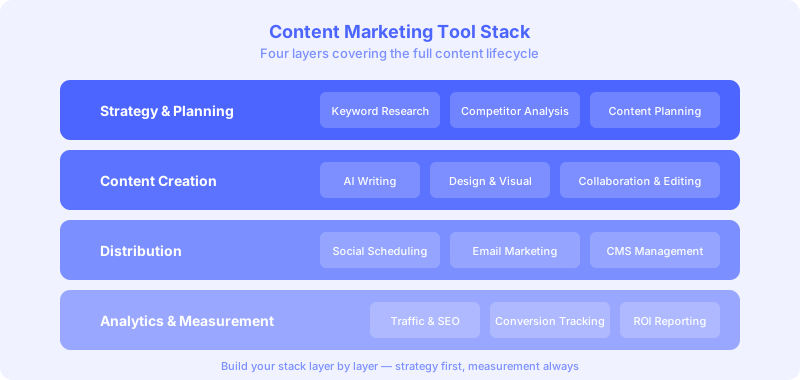
This list is organized by what content teams actually need to do: plan and research topics, create and brief content, optimize for search, distribute and promote, and track performance. Within each category, the tools that consistently deliver results for mid-size teams are named and described honestly, including their limitations.
81% of B2B marketers now use generative AI in their content workflows, according to recent industry data. The tool landscape has shifted accordingly, and the stacks that worked in 2023 often need updating to stay competitive in 2026. For a deeper look at how AI content writing tools fit into the modern stack, that comparison covers the leading options by use case.
How to Use This List
Read through the full list before purchasing anything. The most common mistake is buying tools in the wrong order: teams frequently invest in AI writing tools before they have a keyword strategy, or in distribution platforms before they have content worth distributing.
The sequence matters. Research and planning tools produce the foundation. Creation and optimization tools build on that foundation. Distribution and analytics tools measure and amplify results. Building the stack in that order avoids investing in infrastructure you cannot yet use effectively.
Planning and Research Tools
Semrush
Semrush is the most complete research platform for content marketers who need keyword data, competitor analysis, and topic research in one subscription. The Keyword Magic Tool generates cluster suggestions that inform your editorial architecture. Topic Research surfaces content ideas based on what performs in your niche.
The Content Marketing Toolkit add-on includes SEO Writing Assistant, which integrates with Google Docs and scores content as you write. For teams that want a single premium research subscription, Semrush covers more of the content marketing workflow than any competitor.
Best for: Teams that need keyword research, competitive intelligence, and content briefs from one platform.
Price: Starts at approximately $140/month. The Content Marketing Toolkit is an add-on.
Ahrefs
Ahrefs is the benchmark for backlink data and organic search analysis. Content Explorer lets you find top-performing content in any niche by traffic, referring domains, or social engagement, making it an effective tool for identifying what works before planning your own coverage.
The keyword database is comprehensive, and the Site Explorer gives detailed visibility into competitor organic strategies. For teams where backlink analysis and ranking research are the primary use cases, Ahrefs is the cleaner choice over Semrush.
Best for: Teams prioritizing competitive backlink and keyword research over content planning features.
Price: Starts at approximately $129/month.
Google Search Console (free)
Search Console is free, accurate, and underused. For any team with existing content, the Performance report is the most reliable keyword research tool available: it shows exactly which queries drive impressions to your pages, where your CTR falls below average, and which pages have ranking potential that optimization could unlock.
Pair it with GA4 and you have a powerful analytics foundation at zero cost. The SEO content analytics setup built around these two free tools outperforms many paid stacks when configured properly.
Best for: All teams. Start here before adding paid tools.
Content Briefing and Planning Tools
ClusterMagic
ClusterMagic maps your entire content strategy at the cluster level rather than the keyword level. It identifies which pillar and supporting pages you need, which existing pages are competing with each other for the same keywords, and which topic areas have gaps your competitors are filling.
For teams building a blog content strategy from the ground up or auditing an existing library, the cluster view surfaces decisions that keyword-by-keyword tools miss entirely. A well-structured topic cluster consistently outranks isolated posts targeting the same keywords.
Best for: Teams planning content architecture and managing content libraries with more than 50 published pages.
Frase
Frase generates detailed content briefs by analyzing the top-ranking results for any keyword. The briefs include required subtopics, questions to answer, suggested headings, and recommended content length based on what ranks. The in-editor optimization score updates as you write.
For individual writers or small teams, Frase is the most cost-effective tool that combines briefing and optimization in a single interface.
Best for: Writers and small teams who need research-backed briefs quickly. The Google Docs integration works smoothly in a typical writing workflow.
Price: Starts at approximately $45/month.
Notion or Airtable for Editorial Planning
Neither Notion nor Airtable is an SEO tool, but both are widely used for managing editorial calendars, content briefs, and production workflows. A well-structured editorial database in either platform coordinates assignment, tracking, review, and publishing without requiring a dedicated content operations tool.
For teams building a content brief template system, Airtable's relational database structure makes it easier to connect briefs to keywords, cluster assignments, and publication dates than a flat spreadsheet.
Best for: Teams of 3-15 people who need editorial coordination without enterprise software complexity.
Content Creation and Optimization Tools
Surfer SEO
Surfer SEO scores content against the top-ranking pages for a target keyword in real time. The Content Editor shows which semantic terms are missing, whether your heading structure matches top-ranking patterns, and where your content falls short on depth. The integration with Google Docs and WordPress keeps the feedback inside your existing writing environment.
For teams optimizing existing content at scale, Surfer's Audit feature identifies which published pages need the most work and what specifically to change, which feeds directly into a content creation process optimization workflow. If you prefer a hands-on checklist approach, the on-page content optimization checklist covers the same ground step by step.
Best for: Content teams writing and optimizing a high volume of posts who need real-time scoring feedback.
Price: Starts at approximately $99/month.
Clearscope
Clearscope focuses on semantic keyword coverage and produces a scored list of terms that should appear in well-optimized content. The interface is simpler than Surfer, which makes it faster to use in a high-volume environment. The Google Docs integration is consistently reliable.
Best for: Teams that prioritize semantic optimization over comprehensive scoring. Works well alongside a separate technical SEO tool.
Price: Starts at approximately $189/month (includes multiple users).
Grammarly Business
Grammarly handles copy editing, tone consistency, and style enforcement across a team. The Business plan includes a style guide feature that enforces brand-specific rules (no em dashes, active voice, specific terminology) automatically. For teams scaling content output, consistent style enforcement through a tool reduces editing time and improves publication quality.
Best for: Content teams with multiple writers who need consistent voice and quality control at scale. Pair it with a content approval workflow to formalize the review process alongside style enforcement.
Visual Content and Design Tools
Canva for Teams
Canva is the standard for non-designer content teams that need to produce blog images, social graphics, and visual assets consistently. The Brand Kit feature enforces color palettes, fonts, and logo usage, ensuring all visual content looks cohesive without requiring a designer for every asset.
Best for: Marketing teams without dedicated designers who produce visual content regularly. The template library significantly reduces production time.
Loom
Loom captures screen recordings and narrated walkthroughs that convert into video content, tutorial assets, and repurposed social clips. For B2B content teams, Loom-recorded product demos and how-to content produce useful assets with minimal production overhead.
Best for: Teams looking to expand into video content without a video production budget.
Distribution and Promotion Tools
ConvertKit or Beehiiv for Email
Email remains one of the highest-ROI distribution channels for content marketing. Both ConvertKit and Beehiiv are built specifically for content-first brands and provide segmentation, automation, and analytics suited to a newsletter-style distribution model.
For teams building a subscriber base as a content distribution channel, email automation that sequences related posts for new subscribers extends the value of each piece of content beyond its initial publish traffic.
Buffer or Later for Social Scheduling
Social media distribution is most effective when systematized rather than ad hoc. Both Buffer and Later provide scheduling, analytics, and multi-platform posting from a single interface. The goal is not a large follower count but consistent distribution that builds awareness among the right audiences over time.
Analytics and Reporting Tools
Google Analytics 4 (free)
GA4 is the core performance measurement layer for every content program. Properly configured with conversion events and content groupings, it shows which content categories drive conversions, which posts produce the highest engagement, and how content contributes to pipeline through multi-touch attribution.
Most teams underuse GA4 because initial setup is more complex than Universal Analytics was. The investment in configuration pays back immediately in reporting clarity.
Looker Studio (free)
Looker Studio builds unified dashboards from GA4, Search Console, Semrush, and other data sources. For weekly or monthly content performance reporting, a Looker Studio dashboard that shows organic traffic, keyword rankings, conversions, and content velocity in one view is faster and more useful than logging into multiple platforms separately.
Best for: All teams that report to stakeholders outside the marketing function. The visibility it provides for content ROI reporting is significant.
Building a Stack That Matches Your Stage
For early-stage teams (less than 50 published pages): Start with Google Search Console, GA4, and one premium keyword research tool (Semrush or Ahrefs). Add Frase for briefs when you are publishing four or more posts per month. Keep everything else simple until you have a reliable production rhythm.
For growing teams (50-200 published pages): Add Surfer SEO or Clearscope for optimization. Implement Airtable or Notion for editorial workflow management. Build a Looker Studio dashboard for reporting. Consider ClusterMagic to audit your content architecture and identify cluster gaps.
For scaling teams (200+ published pages, multiple writers): Add Grammarly Business for style consistency. Formalize your scale content production process with documented standards for every tool in the stack. Run quarterly content audits to identify decay and optimization opportunities across the full library.
The right stack for any team is the one that covers actual workflow gaps, not the one with the most features. Start lean, measure what is working, and add tools when you can clearly articulate what problem they solve.
If you want to see where ClusterMagic fits into your existing stack and how it handles the cluster planning and gap analysis layer that most tools skip, book a walkthrough and we will show you how it works with what you already have.
Recommended Posts





.svg)