

.svg)
How to Improve SEO of an Ecommerce Website: A Step-by-Step Tutorial | ClusterMagic

Ecommerce sites have a unique SEO challenge that most other websites do not face. Thousands of product pages, faceted navigation generating duplicate URLs, thin content repeated across variants, and category pages treated as navigation rather than ranking assets. Knowing how to improve SEO of an ecommerce website starts with understanding that the standard SEO playbook needs significant adaptation for stores.
The good news is that most online stores leave significant ranking potential on the table. Category pages sit empty. Product descriptions are copied from manufacturer spec sheets. Technical issues like crawl bloat go unaddressed for years. Each of these gaps is an ecommerce SEO improvement waiting to happen, and most of them do not require a site redesign to fix.
This tutorial walks through the process step by step, from the technical foundation through content optimization to the ongoing maintenance that keeps rankings climbing.
Step 1: Audit Your Technical SEO Foundation
Before optimizing a single product page, confirm that search engines can efficiently crawl and index your store. Ecommerce sites are prone to technical issues that suppress rankings across the entire domain.
Fix Crawl Budget Waste
Large stores generate thousands of URLs through filters, sort options, and product variants. If Google spends its crawl budget on filter pages for "red shoes sorted by price ascending," it has less budget for your actual product and category pages.
Identify and block non-essential URLs from crawling. Use Screaming Frog's SEO Spider to crawl your site and flag URLs generated by faceted navigation. Then use robots.txt or the noindex tag to prevent Google from wasting resources on pages that add no search value. Google's own guidance on managing crawl budget covers the specific directives to use.
Resolve Duplicate Content
Product variants (size, color, material) often create near-duplicate pages. A blue shirt and a red shirt with identical descriptions except for the color create a duplicate content problem. The fix is canonical tags that point all variant pages to a single preferred URL, consolidating ranking signals instead of splitting them.
Check for duplicate title tags and meta descriptions across your catalog. In a store with 5,000 products, hundreds of pages may share identical metadata. Each one needs a unique title and description that reflects the specific product.
Improve Page Speed
Ecommerce pages tend to be image-heavy and script-heavy, which drags down load times. Google PageSpeed Insights will identify the specific bottlenecks. Common ecommerce speed issues include uncompressed product images, excessive third-party tracking scripts, and render-blocking JavaScript from chat widgets and review platforms.
Target a Largest Contentful Paint under 2.5 seconds. Every second above that threshold costs rankings and conversions.
Step 2: Optimize Your Category Pages
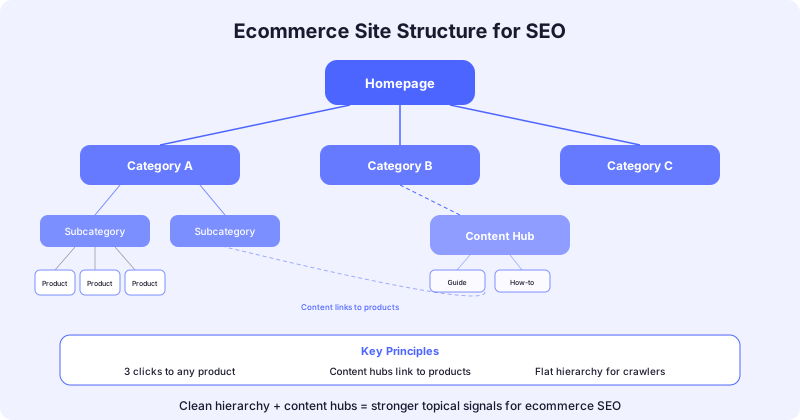
Category pages are the most underutilized asset on most ecommerce sites. They sit between the homepage and product pages in the site hierarchy, which gives them the structural authority to rank for high-volume keywords. But most stores treat them as nothing more than product grids.
Add Meaningful Content Above and Below the Grid
A category page for "women's running shoes" that contains only product thumbnails gives Google almost nothing to evaluate for relevance. Add 100 to 200 words of introductory copy above the product grid that contextualizes the category and uses the target keyword naturally.
Below the grid, add a longer section (200 to 400 words) that answers common buyer questions about the category. What should someone look for when buying running shoes? How do trail runners differ from road runners? This copy serves both SEO and conversion by helping undecided buyers narrow their choices.
Build Internal Links Between Related Categories
Your category architecture should mirror how buyers think, not just how your inventory system is organized. Link from "Women's Running Shoes" to "Women's Trail Running Shoes" and "Running Shoe Accessories." These internal links help Google understand the topical relationships between your categories and distribute ranking authority across the hierarchy.
Review your internal linking structure specifically for category-to-category and category-to-content connections. Most stores link products to their parent category but miss the horizontal linking between related categories.
Step 3: Improve Product Page SEO
Write Unique Product Descriptions
The single highest-impact change most stores can make is replacing manufacturer-provided descriptions with original copy that speaks to the buyer's intent. Manufacturer descriptions are duplicated across every retailer that sells the same product. Google has no reason to rank your version over anyone else's.
Unique descriptions do not need to be long. Three to four sentences that describe the product in terms of what the buyer gets (not just what the product is) can differentiate a page enough to rank. Focus on use cases, key benefits, and what makes this product different from alternatives in the same category.
Implement Product Schema Markup
Product structured data tells Google about price, availability, reviews, and shipping details. Pages with product schema can earn rich results in search, which display star ratings, prices, and stock status directly in the SERP. These rich results earn significantly higher click-through rates.
Follow Google's product structured data documentation to implement the required fields. At minimum, include name, price, availability, and review aggregate. Test your implementation with Google's Rich Results Test before deploying site-wide.
Optimize Product Images
Product images are both a conversion asset and an SEO asset. Optimize them for both purposes:
- Descriptive file names: "merrell-moab-3-waterproof-hiking-boot.jpg" ranks in image search; "IMG_4729.jpg" does not.
- Alt text that describes the product: Include the product name and a key attribute. "Merrell Moab 3 waterproof hiking boot in earth brown" is useful for both accessibility and SEO.
- Compressed file sizes: Use WebP format where supported. A product page with six uncompressed 4MB images will never load fast enough to rank well.
Step 4: Build Supporting Content
Product and category pages target purchase-intent keywords. But buyers also search informational queries earlier in their journey. A content strategy that supports product discovery captures that upstream traffic and funnels it toward your products.
Create Buying Guides and Comparison Content
Buying guides answer the questions buyers have before they know which specific product they want. "Best running shoes for flat feet" or "how to choose a hiking backpack" are informational queries that lead directly to purchase decisions. These posts should live on your blog and link directly to relevant product and category pages.
Comparison content ("Nike Pegasus vs. Brooks Ghost for daily training") targets commercial-intent keywords where the buyer is actively evaluating options. These pages convert at high rates because the reader is already in buying mode. They also earn more organic keywords than product pages because they cover multiple products and use cases.
Build Topic Clusters Around Product Categories
Each major product category can anchor a content cluster. A store selling outdoor gear might build clusters around:
- Trail running (pillar: complete guide to trail running gear)
- Hiking equipment (pillar: how to choose hiking gear for beginners)
- Camping essentials (pillar: car camping vs. backpacking gear guide)
Each cluster supports the associated category page with topical authority. As the cluster grows, the category page ranks for increasingly competitive terms because Google recognizes the site as a deep resource on that topic. This is the same cluster model that works for service businesses, adapted for ecommerce.
Step 5: Improve Site Architecture for SEO
Flatten Your URL Structure
Every product page should be reachable within three clicks from the homepage. Deep URL structures (yourstore.com/category/subcategory/sub-subcategory/product) dilute authority and make crawling inefficient. Flatter structures concentrate ranking power and make it easier for Google to find and prioritize your most important pages.
A practical URL structure for ecommerce:
- Categories: yourstore.com/category-name/
- Products: yourstore.com/category-name/product-name/
- Blog: yourstore.com/blog/post-slug/
Avoid including unnecessary directories, session IDs, or tracking parameters in your URLs.
Create an HTML Sitemap for Large Catalogs
XML sitemaps help Google discover your pages, but an HTML sitemap serves both users and crawlers. For stores with hundreds or thousands of products, a well-organized HTML sitemap ensures every category and key product is discoverable, even if internal linking has gaps.
Manage Out-of-Stock Products Correctly
Ecommerce sites constantly rotate inventory. How you handle out-of-stock pages affects SEO. Do not 404 or delete pages that have earned rankings or backlinks. Instead, keep the page live with a notice that the product is currently unavailable, suggest related alternatives, and consider adding a "notify me when back in stock" option.
If a product is permanently discontinued, 301 redirect the URL to the closest alternative product or the parent category page. This preserves whatever authority that URL has earned.
Step 6: Monitor and Iterate
Track Rankings by Page Type
Ecommerce SEO improvement is not one-and-done. Set up tracking that separates performance by page type:
- Category pages: Track rankings for head terms and mid-tail category keywords
- Product pages: Track rankings for product-specific and long-tail queries
- Blog content: Track rankings for informational keywords that support product discovery
Semrush's Position Tracking lets you tag keywords by page type and track each segment separately. This reveals whether your ecommerce SEO improvement efforts are working across the entire funnel, not just in one area.
Run Quarterly Technical Audits
New products, site updates, and platform changes introduce technical issues continuously. A quarterly crawl with Screaming Frog or Sitebulb catches broken links, new duplicate content, crawl errors, and page speed regressions before they compound into ranking losses.
Refresh Top-Performing Content Regularly
Buying guides and comparison content date quickly. Product models change, prices shift, and new competitors enter the market. Update your top-performing content pieces at least every six months to keep them current and maintain rankings.
Check Google Search Console performance data for content pages with declining clicks. A refresh that updates product recommendations, adds new sections, and fixes outdated information often recovers lost traffic within 4 to 6 weeks.
The Priority Order for Ecommerce SEO Improvement
If you are wondering where to start, here is the priority stack ranked by impact:
- Fix technical crawl issues (foundation for everything else)
- Optimize category pages with unique content (highest volume keywords)
- Implement product schema markup (improves CTR across all product pages)
- Write unique product descriptions for top-selling items first
- Build one content cluster around your highest-revenue category
- Establish quarterly audit and refresh cycles
Each step builds on the one before it. Skipping the technical foundation to jump straight to content means building on unstable ground.
Ready to identify the specific ecommerce SEO improvements that will move the needle for your store? Book a strategy session and we will audit your current setup and map out a prioritized action plan.
Recommended Posts





.svg)