

.svg)
Keyword Mapping: How to Assign Keywords to Pages (Step-by-Step) | ClusterMagic

If your site has more than a handful of pages, there's a good chance multiple pages are accidentally competing against each other in search. Keyword mapping is the process that prevents that from happening. It gives every page a clear purpose, a defined audience, and a specific keyword target, so your content works together instead of against itself.
Most teams skip this step. They do keyword research, write content, and hope the right pages surface for the right queries. Sometimes that works. More often, it creates a fragmented site where Google has to guess what each page is for, and the result is mediocre rankings across the board. Keyword mapping is one of the foundational steps in any solid SEO content strategy.
This guide explains what keyword mapping is, how it differs from keyword research, and how to build one step by step.
What Keyword Mapping Is (and Why It Matters)
Keyword mapping is the practice of assigning a specific target keyword to each page on your site. The output is a document (usually a spreadsheet) that shows which page is responsible for which query, what the intent behind that query is, and where that page sits in your overall site structure.
The reason it matters comes down to how search engines evaluate relevance. When multiple pages on your site target the same or very similar keywords, Google has to decide which one to show. Often it shows neither prominently, because the signal is diluted. A clear keyword map solves this by giving each page an unambiguous role.
Beyond rankings, a keyword map gives your content team a framework for decision-making. When a new content idea comes up, the map tells you whether it belongs as a new page, an expansion of an existing page, or a subtopic within a cluster. Without that framework, content decisions become ad hoc, and the site structure grows in ways that undermine rather than reinforce your SEO.
Semrush's overview of keyword mapping is a solid reference if you want additional context before building your own.
Keyword Mapping vs. Keyword Research
These two activities are related but distinct. Confusing them leads to doing one and assuming you've done both.
Keyword research is the process of finding and evaluating search queries. You're answering the question: what are people searching for, and which of those terms has the right combination of volume, difficulty, and intent to be worth targeting? For teams focused on lower-competition terms, a long-tail keyword optimization strategy pairs naturally with keyword mapping by ensuring each specific phrase has a dedicated page.
Keyword mapping is what happens after research. You're answering the question: which of our existing or planned pages should target each keyword we've identified? It's an organizational exercise that connects research outputs to your actual site.
A keyword research project might produce a list of 200 relevant terms. Keyword mapping takes that list and assigns each term to a specific URL, decides which terms belong on the same page, and flags terms that don't fit anywhere yet (which becomes input for your content plan). The two activities feed each other, but neither replaces the other.
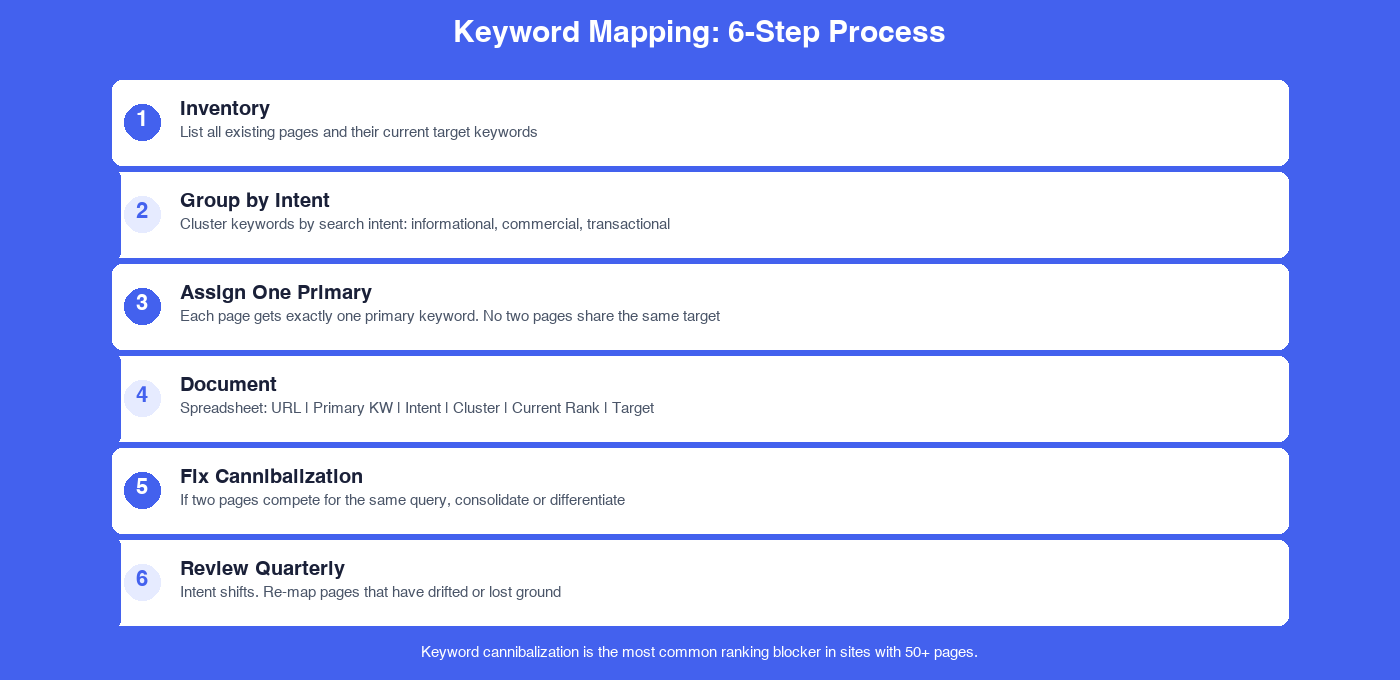
Step-by-Step: How to Build a Keyword Map
Step 1: Inventory Your Existing Pages
Start with what you have. Export a list of all indexed pages on your site using Google Search Console (the Coverage report shows indexed pages) or crawl the site with a tool like Screaming Frog. For each page, note the URL and what the page is currently about.
You don't need every page, focus on the ones that matter for organic search: blog posts, landing pages, product or service pages, and any cornerstone content. Thin utility pages (contact, privacy policy, login) can be set aside.
Step 2: Pull Ranking Data for Existing Pages
Before assigning new keywords, understand what each page currently ranks for. In Google Search Console, check the Performance report and filter by page to see which queries are surfacing each URL. This tells you two things: what Google already associates with each page, and whether that association matches what you intended.
Ahrefs Site Explorer can supplement this by showing organic keywords any page ranks for, including positions outside the top 10 that Search Console may not surface clearly.
Step 3: Group Keywords by Intent
Take your keyword research output and group terms by search intent before you start assigning. Intent categories to work with:
- Informational: The searcher wants to learn something ("what is keyword mapping")
- Navigational: The searcher is looking for a specific site or brand
- Commercial investigation: The searcher is evaluating options ("best keyword mapping tools")
- Transactional: The searcher is ready to act ("keyword mapping service")
Keywords with the same intent and closely related meaning should live on the same page. Keywords with different intent, even if topically similar, often belong on different pages. Mixing intent within a single page usually results in a page that satisfies no one query fully.
Step 4: Assign One Primary Keyword Per Page
Every page gets one primary keyword: the term it's most directly optimized for and the one you most want it to rank for. This keyword should appear in the title tag, H1, meta description, and naturally throughout the body content. For a systematic approach to programmatic SEO, keyword mapping at scale becomes essential when you are generating pages programmatically across hundreds of terms.
Secondary keywords (related terms, synonyms, long-tail variations) can be incorporated into the same page. They should support the primary, not compete with it. A page targeting "keyword mapping" might also rank for "keyword mapping template" and "how to map keywords," and that's fine. What you're avoiding is having two separate pages both trying to rank for "keyword mapping" as their primary target.
Step 5: Document Everything in a Spreadsheet
The keyword map itself is a living document. At minimum, your spreadsheet should have these columns:
| Page URL | Primary Keyword | Search Intent | Current Rank | Cluster |
|---|---|---|---|---|
| /blog/keyword-mapping-guide | keyword mapping | informational | 24 | seo-strategy |
| /blog/content-gap-analysis | content gap analysis | informational | 8 | seo-strategy |
| /services/seo-content | seo content services | commercial | not ranking | services |
Add a "Notes" column for anything that needs follow-up: pages where cannibalization is suspected, pages that need a rewrite, or gaps where no existing page covers a target keyword. That notes column becomes your content backlog.
Step 6: Identify and Resolve Cannibalization
Cannibalization happens when two or more pages on your site are competing for the same primary keyword. You can spot it by checking whether multiple pages appear in Search Console for the same query, or by running a site search (site:yourdomain.com "keyword") to see how many pages mention the term prominently.
When you find it, you have a few options:
- Merge the pages. If both pages cover the same topic at similar depth, combine them into one stronger piece and redirect the weaker URL to the stronger one.
- Differentiate the focus. If the pages legitimately serve different intents or subtopics, adjust the content and metadata to make each one's unique purpose clearer.
- Consolidate with a canonical tag. For pages that need to exist separately (like pagination or filtered views), use a canonical tag to tell Google which version is the primary.
Ahrefs' guide to keyword cannibalization covers the diagnostic process in detail and is worth bookmarking for when you hit a tricky case.
How Keyword Maps Connect to Content Clusters
A keyword map and a content cluster strategy reinforce each other. In a cluster model, a pillar page targets a broad primary keyword, and cluster pages target related subtopics, all linking back to the pillar. The keyword map is how you document which page owns which query within that structure.
When you're building out a cluster, the map tells you: which subtopics are already covered (and by which URL), which subtopics have no assigned page yet, and whether any existing pages are duplicating effort. Running a content gap analysis alongside your keyword map surfaces the unmapped opportunities most efficiently. For a deeper look at how clusters and pillar pages work together structurally, see our guide on content clusters and pillar pages. And if you're starting a new cluster from scratch, a solid content brief template ensures each piece of content knows exactly which keyword it owns before writing begins.
A keyword map without a cluster strategy is just a spreadsheet. The cluster structure is what turns that spreadsheet into a site architecture that builds topical authority over time.
A Simple Keyword Mapping Template
If you're starting from scratch, here's a straightforward column structure to use:
- Page URL, the full path (/blog/post-slug or /services/page-name)
- Page Type, blog post, landing page, product page, pillar page
- Primary Keyword, the one term this page is optimized for
- Monthly Search Volume, pulled from your research tool
- Keyword Difficulty, 0-100 score from Ahrefs or Semrush
- Search Intent, informational, commercial, transactional, navigational
- Current Rank, pulled from Search Console or Ahrefs
- Cluster, which topic cluster this page belongs to
- Internal Links From, which other pages link to this one
- Status, live, draft, planned, needs update
You don't need anything more complicated than this to start. The value isn't in the sophistication of the spreadsheet; it's in having the information in one place where your team can make decisions from it.
Moz's keyword research resources include templates and frameworks worth reviewing before you build your own version.
When to Revisit and Update Your Keyword Map
A keyword map isn't a one-time project. It's a document you maintain as your site grows. Plan to revisit it in these situations:
- Quarterly, at minimum. Rankings shift, new content gets published, and old content drifts. A quarterly review keeps the map accurate.
- After publishing a batch of new content. Add new pages to the map before they go live, not after.
- After a site migration or URL restructure. Any time URLs change, the map needs updating.
- When traffic to a key page drops unexpectedly. A sudden traffic drop often signals that a competing page has emerged on your own site or a closer competitor has overtaken you. The map helps you diagnose quickly.
The teams that get the most value from keyword mapping are the ones who treat it as infrastructure, not a one-time audit. It takes a few hours to build initially and 30 to 60 minutes per quarter to maintain. That investment pays off every time a new content decision gets made faster because the answer is already documented.
Keyword mapping doesn't have to be complicated. The goal is simple: every page on your site should have one clear keyword it's trying to rank for, that keyword should match the page's actual content and intent, and no two pages should be competing for the same primary term. Get that right, and your site structure starts working for you instead of against you.
If you want to get started with a content program that has keyword mapping, cluster architecture, and production built in from the start, it's worth seeing how ClusterMagic handles this end to end.
Recommended Posts





.svg)